Lesson Description
In this lesson, we will discover Art Panel Pro's (v 3.1) new artificial intelligence engine for completely removing stars and creating a perfect Starless image. This model is specially trained for wide-angle images, eliminating typical landscape lens halos and chromatic aberrations, and cleaning up micro background noise. You will learn to extract stars flawlessly, recover that information on a separate layer, and apply precise color corrections before merging them back with your sky.
What you will learn
- Add final volume using separate curves: one for background contrast and another for star brightness.
- Run the Starless AI engine using the keyboard shortcut (Control/Command + click the button).
- Take advantage of the automatic micro-noise reduction that the model applies to the background.
- Retrieve the extracted stars on a completely independent layer.
- Remove chromatic aberration directly on isolated stars.
Pro Tip:
To clean chromatic aberration on your isolated stars, always remember to first change the blend mode of that layer to "Normal." Once you apply the halo correction adjustment and they look clean, re-blend the layer using Screen, Color Dodge, or Linear Dodge.
For a better result (if you have a lot of noise in your photograph), apply noise reduction first, and then apply Starless AI.
Practical Checklist
- Create a new layer (New) and apply Starless AI (Control/Command + click).
- Retrieve the stars on a new layer with the corresponding button.
- Switch the star layer to Normal, correct the color halos, and return it to its blend mode.
- Apply a curve to the background (to add contrast) and another curve to the star layer (to control its brightness).
Technical Glossary
- Starless AI: Artificial intelligence engine optimized for landscape astrophotography, capable of removing stars, optical halos, and micro-noise in a single step.
- Chromatic Aberration: Optical defect in lenses (very common in wide-angle lenses) that generates unwanted color halos around stars.
- Linear Dodge / Screen / Color Dodge: Blend Modes (Linear Dodge (Add), Screen, Color Dodge) ideal for naturally integrating starlight onto a sky background.
First use notice
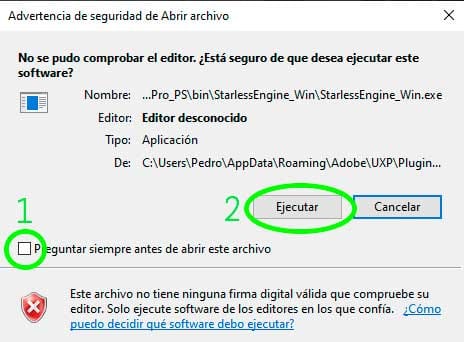
When running the artificial intelligence engine for the first time, it is completely normal for your operating system to display a security or permission prompt. Don't worry, it's a standard system procedure:
On Windows: A warning window will appear. You will see a checkbox that is checked by default saying "Always ask before opening this file". I recommend you uncheck it so this annoying message doesn't appear every time you use the AI, and then simply click "Run".